Data Encryption at Rest: How It Works and Why It Matters

Data stored in files, databases, backups, and cloud platforms remains vulnerable to theft and unauthorized access. Learn how encryption at rest protects stored information, how it differs from encryption in transit and in use, and which best practices help organizations manage keys and storage securely.
On this page
Sensitive information does not stop being valuable when it is no longer moving across a network. Customer records, financial documents, application logs, source code, and intellectual property may remain stored for months or years. If an attacker steals a device, compromises a cloud account, or gains access to a backup repository, that information can be exposed.
Data encryption at rest reduces this risk by making stored content unreadable without an authorized cryptographic key. It is not a complete security strategy on its own, but it adds an essential protection layer when storage devices, databases, or cloud resources are accessed outside their intended controls.
What Is Encryption at Rest and How Does It Work?
What is encryption at rest? It is the process of protecting information while it is stored rather than actively moving between systems or being processed by an application.
Data at rest includes documents saved on hard drives, database records, cloud objects, virtual machine disks, archived emails, snapshots, removable media, and backup copies. Although this information is not currently traveling across a network, it can still be stolen, copied, altered, or exposed through weak permissions and configuration errors.
Encryption converts readable information, known as plaintext, into ciphertext by applying a cryptographic algorithm and an encryption key. The resulting ciphertext appears meaningless to anyone who cannot access the correct key. When an authorized user or application requests the information, the system uses the key to decrypt it and restore a readable version.
Storage encryption commonly relies on symmetric cryptography because it can process large quantities of data efficiently. The same key is used for encryption and decryption, which makes the protection of that key especially important. Strong algorithms cannot compensate for keys that are exposed, copied, or accessible to too many users.
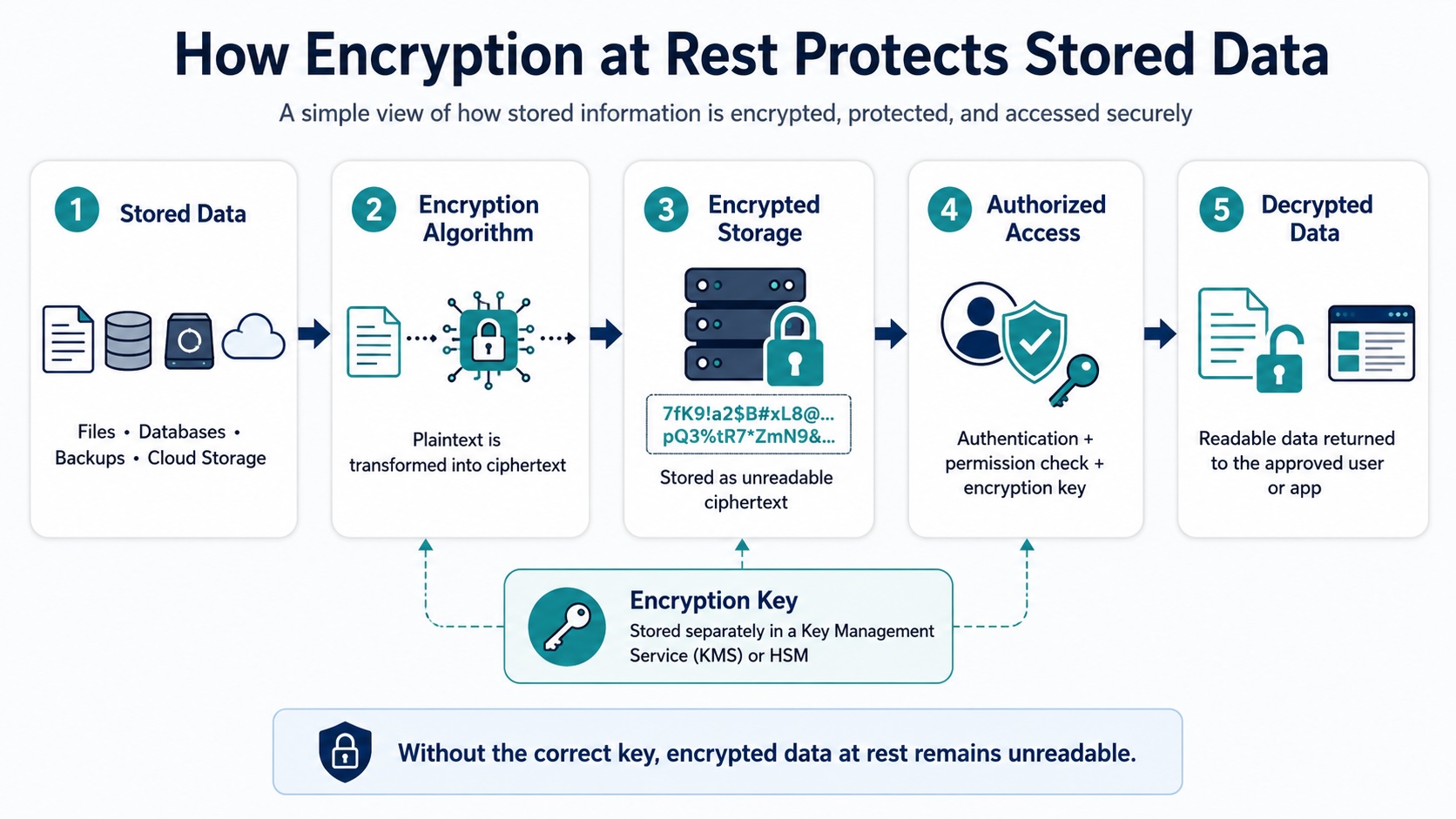
A typical access flow begins when a user or service authenticates to an application. The application verifies whether the request is permitted and then asks a key management system to use the required encryption key. The information is decrypted only for the approved operation.
Encryption can be implemented at several layers. Full-disk encryption protects an entire device or storage volume. File-level encryption protects selected files and folders. Database encryption may cover the full database, specific tables, or individual fields. Cloud services can also encrypt object storage, managed databases, snapshots, and backups.
The appropriate method depends on where the information is stored and how it is used. Full-disk encryption can protect a stolen laptop, while field-level encryption may reduce exposure when an attacker reaches a database but should not be able to read sensitive customer records.
Data at Rest vs Data in Transit vs Data in Use
Information moves through three main states: at rest, in transit, and in use. Each state presents different risks and requires its own security controls.
Data encryption at rest protects stored content if someone copies a database file, removes a disk, accesses a backup, or reaches an exposed cloud storage resource. However, storage encryption may not prevent misuse by a compromised account or application that already has permission to decrypt the information.
Data in transit is information moving between devices, applications, networks, or cloud services. It is commonly protected with protocols such as TLS, which help prevent interception and manipulation while data travels. Encrypting stored files does not automatically protect them once they leave storage and cross a network.
Data in use is actively being opened, changed, analyzed, or processed. Because applications need readable information to perform legitimate operations, this state can be more difficult to secure. Protection depends heavily on access controls, secure application design, workload isolation, authentication, and monitoring.
| Data State | What It Means | Common Examples | Primary Protection |
| Data at Rest | Information stored on a device or platform | Files, databases, disks, backups, cloud objects | Storage encryption, access control, key management |
| Data in Transit | Information moving between systems or networks | Web traffic, API requests, email, file transfers | TLS, secure tunnels, encrypted communication protocols |
| Data in Use | Information actively processed by an application | Data in memory, active workloads, open documents | Authentication, workload isolation, monitoring, confidential computing |
The comparison of data at rest vs data in transit vs data in use demonstrates why organizations need a layered security strategy. Protecting only one state leaves gaps elsewhere in the information lifecycle.
For example, a database may be encrypted while stored, but its records can still be exposed through an insecure application or intercepted during transmission if network encryption is not enabled. Organizations should therefore map how information is created, stored, transferred, processed, backed up, and deleted, then apply suitable controls at every stage.
Encryption at Rest Best Practices
Effective data at rest encryption solutions begin with visibility. Organizations should identify where sensitive information is stored and classify it according to business value, confidentiality, and regulatory requirements. Encryption should cover not only production databases but also employee devices, removable media, snapshots, replicas, archives, and backup repositories.
Encryption keys should be stored separately from the data they protect. A dedicated key management service or hardware security module provides stronger protection than saving keys in configuration files, source code, or the same storage environment as the encrypted information. For a closer look at key generation, storage, rotation, recovery, and revocation, read our guide to encryption key management.
Access to keys should follow the principle of least privilege. Only approved applications, services, and administrators should be able to request keys or decrypt sensitive content. Responsibilities should also be separated so that no single account has unrestricted control over both encrypted data and key management.
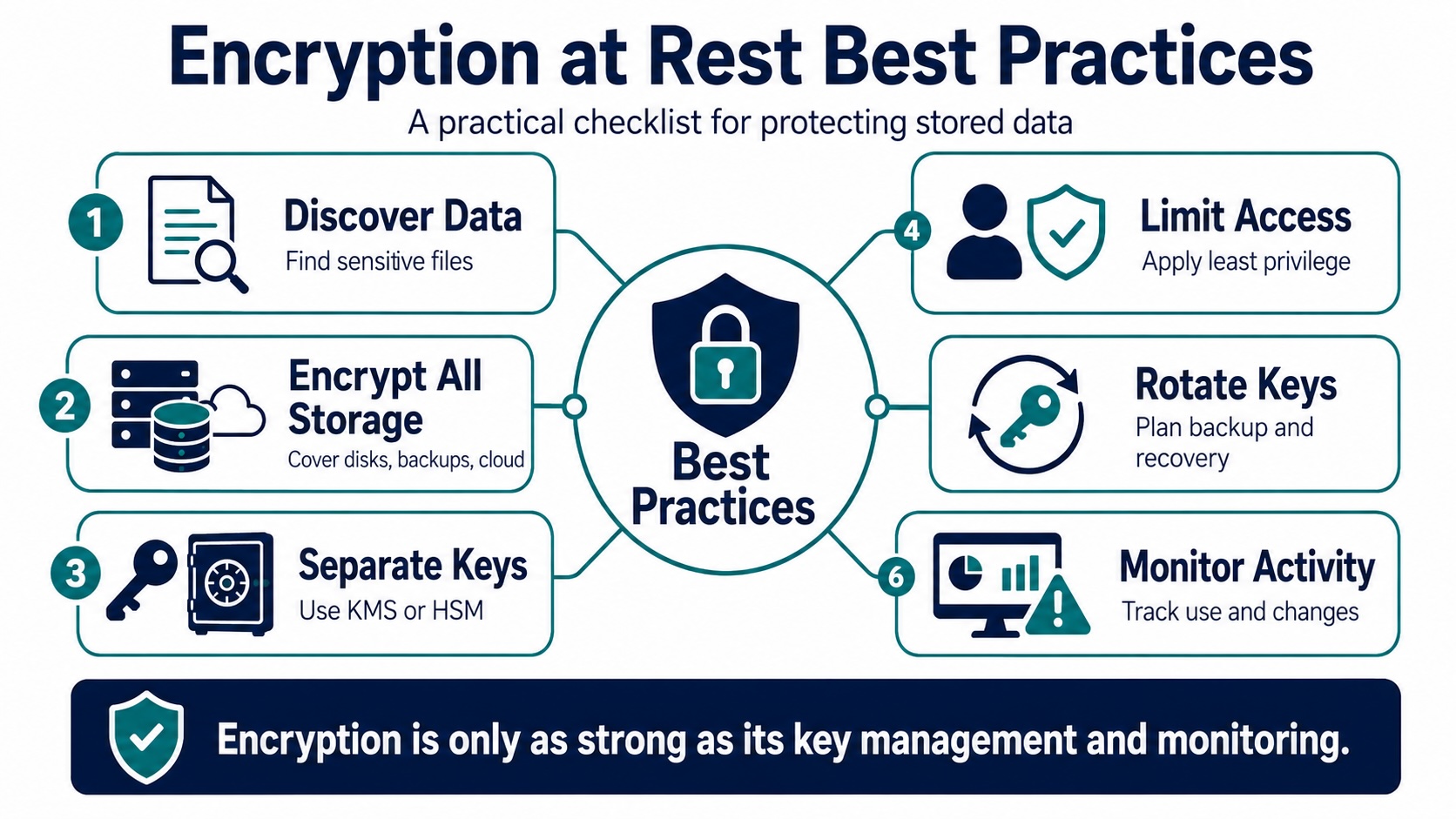
Organizations need documented procedures for key generation, rotation, revocation, backup, recovery, and secure destruction. Regular key rotation can reduce the impact of long-term exposure, but it must be planned carefully to avoid making existing information inaccessible. Recovery processes should be tested before an emergency occurs.
Cloud security settings also require regular review. Teams should confirm whether storage services encrypt information by default, whether customer-managed keys are necessary, and whether new resources automatically inherit required policies. Automated checks can identify unencrypted volumes, public storage resources, excessive permissions, and inactive keys.
Backups need the same protection as live systems. Backup files should be encrypted before or during storage, and access to repositories should be tightly restricted. Recovery tests should confirm that encrypted backups remain usable and that authorized personnel can restore them without bypassing security controls.
Finally, organizations should monitor storage and key activity. Logs should record who accessed sensitive information, which keys were used, and whether permissions or encryption settings changed. Alerts can highlight unusual decryption requests, failed access attempts, disabled encryption, or unexpected key deletion.
Encryption at rest works best as part of a broader data protection program. Combined with secure configuration, access control, monitoring, backup security, and disciplined key management, it can significantly reduce the consequences of lost devices, stolen storage, cloud exposure, and unauthorized access.
Articles by this author